Browse and search
Start with the right flow
PIX, BRL custody and crypto: choose the right flow for each operation.
Receive reais. Choose the withdrawal destination later.
02 / WITHDRAWBalance to cryptoChoose asset, network and wallet for each withdrawal.
03 / OPERATEAPI via TelegramCharges, balance and withdrawals in your project group.
No matching section. Try another term.
Before you start: Brazilian payment terms
You can build the integration in English. Do not translate API identifiers: endpoints, JSON keys, event names, statuses and error codes must be sent and compared exactly as documented. Portuguese identifiers are part of the existing contract; their explanations below are in English.
| Term or field | Meaning |
|---|---|
| PIX | Brazil's instant-payment system. A PIX key identifies a payment destination; it is not an API credential. |
| BRL / R$ | Brazilian reais. An integer amount_cents: 5000 means R$50.00. Crypto amounts and cash-out brl_amount use decimal strings as specified by each route. |
| CPF / CNPJ | Brazilian individual / business tax identifiers. A charge's payer_tax_number identifies the person or business actually paying the PIX, not necessarily your company. Do not substitute a foreign business tax ID for this field. |
saldo / custodia |
Balance / custody. destino: "saldo" credits a BRL balance. It does not automatically buy stablecoins. |
customer_ref |
Your customer or subaccount identifier. It is separate from the payer's tax ID. |
disponivel_cents / bloqueado_cents |
Available / blocked balance in BRL cents. Only available funds can be spent. |
carencia / retencao |
Waiting period / hold. Provider holds, charge holds and balance rules are distinct; read the returned timestamps. |
E2E / pix_e2e |
PIX end-to-end payment identifier, used for verification and reconciliation. |
| MED | PIX Special Return Mechanism, associated with a payment dispute/return process. Follow the incident instructions and actual account restrictions. |
erro / acao / detail |
Stable error code / recommended action / human-readable explanation. Branch on codes, never on the wording of detail. |
corrigir, repetir, esperar, parar, falar_com_suporte |
Fix the request; retry a transient error; wait; stop; contact support. Keep these values unchanged in code. |
API responses, provider explanations and Telegram commands may retain Portuguese text. Use this English reference for their meaning and preserve raw responses for support. Timestamps can include explicit offsets: parse them instead of assuming your local time.
Start with the sandbox guide. Use the English API reference and English OpenAPI while implementing. The AI integration guide covers ChatGPT, coding assistants and the transition to your own backend.
1. Choose your flow
| Goal | Funding | Operation | Result |
|---|---|---|---|
| Collect PIX and choose withdrawal later | Customer's PIX | POST /cashin/charge, destino: "saldo" |
BRL custody balance |
| Withdraw custody as crypto | Available BRL balance | POST /saldo/sacar-cripto |
Conversion and delivery to the chosen asset/network |
| Withdraw custody by PIX | Available BRL balance | POST /payouts |
PIX to the specified recipient |
| Collect PIX and deliver crypto directly | Customer's PIX | POST /cashin/charge, destino: "cripto" |
Delivery to that charge's wallet |
| Sell crypto from an external wallet | External crypto deposit | POST /cash-outs → accept → deposit |
PIX to the recipient |
Custody holds reais. The partner receives the net PIX amount and chooses an asset, network and destination wallet at withdrawal. No fixed wallet is required. A custody deposit does not simultaneously create BTC, ETH and USDT balances.
Defaults differ: the HTTP API still defaults to destino: "cripto". Always send destino: "saldo" for custody. Telegram's /cobrar amount tax-id defaults to custody.
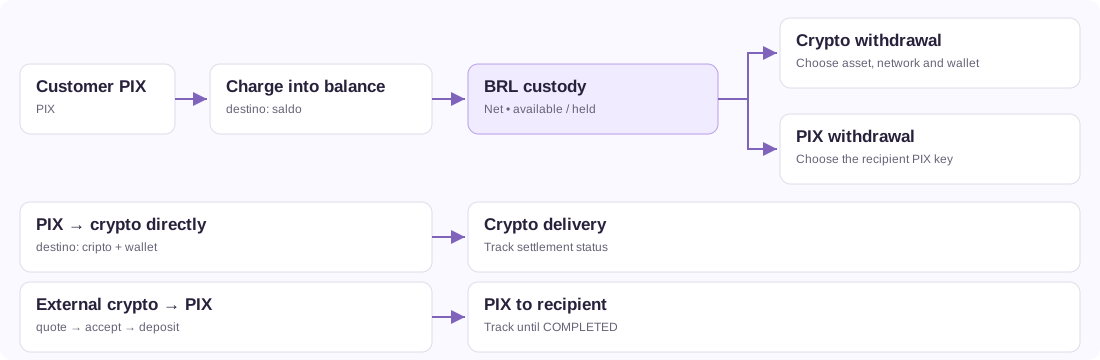
2. Keys and configuration
Join Lunium Partners, the official integrator community. Participation is strongly recommended from the start of integration for operational notices, maintenance, API changes and partner discussions. Learn how the community complements your project group and monitor.
Base URL: https://api.luniumpay.com. Send X-API-Key on authenticated routes and Content-Type: application/json for JSON bodies. Keep the key on your server; it authorizes account operations.
Sandbox
curl --fail-with-body https://api.luniumpay.com/keys/sandbox \
  -H 'Content-Type: application/json' \
  -d '{"email":"you@company.com","name":"My test integration"}'
Replace you@company.com with the email of the person who will test: email is required. About a minute later, LuniumPay support sends that address one message with what LuniumPay is, the 3-step integration, the manual and PDF, the flowchart and VendaCripto (a ready-made app for people who only want to buy or sell crypto with PIX, without integrating). One message per address, with an unsubscribe link. Without a valid email, the response is 400 with erro: "email_obrigatorio". It is still one call, with no approval and no API key; name is optional.
Save api_key as LUNIUM_API_KEY in your server environment. New sandbox keys start with lun_test_; production keys start with lun_live_. Older lun_ keys remain valid.
Sandbox simulates incoming PIX, BRL custody credit, crypto delivery and withdrawal, PIX payout, internal transfers and cash-out. The QR is not bank-payable: confirm it with POST /sandbox/cashin/{cashin_id}/pay. No bank, exchange or blockchain transaction occurs. See the sandbox guide and GET /sandbox for scenarios, persistence and production differences. Custody requires no fixed wallet.
Production without a fixed wallet
One call. No signup, no human approval, no waiting: the production key is issued on the spot, same as the sandbox one. Only name is required; send email anyway, because the credential is delivered there. Joining Lunium Partners is recommended, not a condition.
curl --fail-with-body https://api.luniumpay.com/keys \
  -H 'Content-Type: application/json' \
  -d '{"name":"My project","email":"operations@example.com"}'
Replace the name and email. The response includes api_key, key, limits, monitor_url and Telegram instructions. The full API key is shown at creation only. monitor_url is the project monitoring page; keep that link private as well.
The production website form requests the business name, legal representative, email and tax identification. For a business outside Brazil, use its country and local tax ID. The HTTP API also accepts optional responsavel_legal, documento and documento_pais (two-letter country code, for example NG); supplied values are validated. These business identity fields do not replace the actual Brazilian PIX payer's payer_tax_number.
New production keys are created with custody and payouts enabled. Check your actual settings: payout.enabled in GET /keys/me and custodia_ativa in GET /saldo.
curl --fail-with-body https://api.luniumpay.com/keys/me \
  -H "X-API-Key: $LUNIUM_API_KEY"

curl --fail-with-body https://api.luniumpay.com/saldo \
  -H "X-API-Key: $LUNIUM_API_KEY"
Set an HTTPS webhook_url using PATCH /keys/me and store the returned webhook_secret. settlement_address optionally supplies a default Polygon destination for direct crypto delivery. It is not required for custody or future withdrawals. Reuse sandbox keys; creation is rate limited by IP.
Recover the monitor and manage access
The private monitor provides read-only project tracking. The API key authorizes operations. The monitor link, API key and webhook secret are different credentials; recovering one does not recover the others.
If you lose the link, request it for the email registered on the production key:
curl --fail-with-body https://api.luniumpay.com/keys/painel-link \
  -H 'Content-Type: application/json' \
  -d '{"email":"operations@example.com"}'
This route needs no API key. Its 200 {"ok":true,...} response is deliberately generic: it does not confirm account existence or email delivery. Check the inbox and spam folder. On 429, wait; do not automate repeated requests. If the email is incorrect or inaccessible, contact the project's human support team to validate recovery.
With an available API key, GET /keys/me returns monitor_url. To invalidate an exposed link, send PATCH /keys/me with {"rotate_monitor_token":true} and share the replacement only with authorized staff. The previous link stops working immediately. This does not change the API key or webhook secret.
The full API key is shown only at creation. This process neither redisplays nor recovers it. If lost or exposed, contact support about replacement/revocation and account continuity. Do not create another key assuming balances, charges or links automatically transfer. To rotate the webhook secret, follow the webhook procedure.
Partner dashboard and API access
The Lunium partner dashboard is live, with authenticated team access, operational views, reports and webhook management. Use the painel links returned by key creation or GET /keys/me for the current entry and activation flow. Dashboard login, the API key, private monitor token and webhook secrets are distinct credentials.
The private monitor and feed described below remain separate interfaces. Rotating a monitor token does not reset dashboard credentials. Use the dashboard's own sign-in and recovery flow for dashboard access. For programmatic webhook configuration, the documented PATCH /keys/me path remains available; do not infer a public API route from a dashboard button. Verify any additional route against the published contract and live availability before implementing it.
For Fable and other AI agents: compare the reviewed version and inventory with OpenAPI. If they disagree, record the conflicting source and operation and pause implementation of that capability until clarified; do not invent a route to complete the flow.
3. Collect PIX into custody
Query GET /cashin/limits?payer_tax=CPF_OR_CNPJ with the project's key before charging. The tax ID identifies who pays the PIX; customer_ref identifies a subaccount in your system. They are different fields.
This example collects R$ 50.00. Replace the tax ID and reference and choose an amount allowed for that payer. A production request creates a real charge.
curl --fail-with-body https://api.luniumpay.com/cashin/charge \
  -H "X-API-Key: $LUNIUM_API_KEY" \
  -H 'Content-Type: application/json' \
  -d '{
    "amount_cents":5000,
    "payer_tax_number":"00000000191",
    "destino":"saldo",
    "customer_ref":"customer-42",
    "external_id":"deposit-customer42-001"
  }'
Omit payout_address. Without customer_ref, the credit belongs to the key's own house balance. With a reference, it belongs only to that subaccount.
Save cashin_id and external_id. Display the returned qr_copypaste, qr_image_url when available, amount and expires_at. A generated QR is not proof of payment.
Payment versus settlement
Use GET /cashin/{cashin_id}/status or webhooks. Track both state fields:
| Field | Meaning | Values |
|---|---|---|
status |
PIX state | pending, delayed, under_review, paid, expired, refunded, failed |
settlement_status |
Credit/delivery state | pending, sending, entregando, sent, incerto, failed |
Credit/delivery completes at cashin.settled, or status: "paid" plus settlement_status: "sent". For custody, reconcile the amount and availability with GET /saldo?customer_ref=customer-42 and its statement. A booked credit can still be held; spend only disponivel_cents.
depix_received_cents is the amount received from the settlement provider before custody deposit fees. Its legacy name does not mean that this is the customer's net credit. Reconcile against ledger movements.
Fees and holds
GET /saldo returns deposito_fee_bps, deposito_fee_fixed_cents, carencia_horas, carencia_ate, retencao_acima_cents and proximas_liberacoes. 100 bps = 1%. Do not advertise free deposits without checking the key's effective fees.
| Rule | Fields | Meaning |
|---|---|---|
| Provider hold | held, held_hours, delay_until, delayed |
PIX paid, pending provider release |
| Local charge hold | hold_hours at creation, liberar_em in status, cashin.held |
PIX may be paid while credit/delivery still waits |
| Custody waiting period | carencia_horas, carencia_ate, blocked balance |
Key/subaccount rules affecting available funds and withdrawals |
held_hours and hold_hours are not aliases. held: false can coexist with a local hold. There is no universal 24-hour waiting period for every partner. Instant-balance keys have their own policy, while payer/charge holds and freezes still apply. Read the charge and balance together; a waiting-period refusal returns 423 with the release time.
Payer limits
GET /cashin/limits publishes instant and held-payment bands, usage and release information for the taxpayer. Key conditions can override the ladder. This lookup is advisory: creation revalidates the operation, including instant custody rules.
allow_hold: false refuses a charge when payer-limit rules require a hold. It does not disable other contractual holds or later freezes. Omitting it allows applicable retention. Show the conditions before payment.
The effective minimum depends on fees and provider constraints. Do not assume R$ 1.00 is a valid universal test amount.
8. External crypto to PIX
For external crypto deposits, use cash-out. For spending BRL custody by PIX, use /payouts.
- Query
GET /catalog, the crypto deposit catalog, separate from/cashin/catalog. - Optionally request
POST /cash-outs/previewwithout creating an order. - Create with
POST /cash-outs. - Show asset amount, network, net BRL, recipient and expiry; accept with
POST /cash-outs/{cashout_id}/accept. - Then display the returned
deposit_address,deposit_tagif any, and exact amount. - Track
GET /cash-outs/{cashout_id}or webhooks until a final state.
Sandbox example; use a test LUNIUM_API_KEY:
curl --fail-with-body https://api.luniumpay.com/cash-outs \
  -H "X-API-Key: $LUNIUM_API_KEY" \
  -H 'Content-Type: application/json' \
  -d '{
    "asset":"USDT",
    "network":"polygon",
    "amount":"10.00",
    "pix_key":"test@example.com",
    "pix_key_type":"email",
    "external_id":"sandbox-cashout-001"
  }'
Send either amount (crypto) or brl_amount (target reais), as decimal strings using a dot. Creation can return 200 in production or 201 in sandbox; handle the documented 2xx outcomes. Save the returned cashout_id.
In production, supply a valid refund_address on the same network controlled by the refund recipient. An exchange's sending address can be a shared wallet and may not be a usable return destination.
| Phase | Possible states |
|---|---|
| Quote/deposit | QUOTE_CREATED, AWAITING_DEPOSIT, DEPOSIT_DETECTED |
| Confirmation/conversion | DEPOSIT_CONFIRMED, SELLING, SOLD, FORWARDING, PAYING_OUT |
| PIX completed | COMPLETED |
| Exceptions | MANUAL_REVIEW, REFUNDING_CRYPTO, REFUNDED, EXPIRED, FAILED |
Routes can skip steps. timeline, confirmations and confirmations_required, when present, describe progress. Deposit confirmation is not PIX completion.
On completion, use pix_e2e, pix_paid_at, receipt_url, receipt_pdf_url and verify_url when available. Public GET /v1/verificar/{e2e} verifies a known PIX, not every crypto operation. For refunds, follow REFUNDED and refund_tx_hash; amount and timing depend on the stage/provider result. Do not promise automatic full refunds for every failure. Keep tracking late or mismatched deposits under the original order; do not reuse its address for another transaction.
Recipient lookup and QR payments
GET /pix/keys/lookup?key=...&type=... is optional. It can return HTTP 200 with available: false, verified: false, verification_status: "not_performed" and null names. Display “recipient not verified”; do not invent an owner or treat lookup unavailability as payment unavailability. Sandbox returns a fictional owner with source: "sandbox".
br_code has separate availability. Production can refuse creation with 503 br_code_indisponivel even if preview/sandbox accepts the QR. When enabled, it replaces pix_key, amount and brl_amount and requires a fixed amount and compatible asset. Do not present it as unconditionally enabled.
New crypto-to-PIX sales include a fixed BRL 1.00 operational reserve per order, for all partners, already included in the quote and reported as reserve_brl. Its USDT equivalent is calculated at the current exchange rate and frozen in the order: pix_key_reserve_usd for PIX keys or copia_e_cola_buffer_usd for Copia e Cola. These fields contain the converted amount, not a US$ 1 charge. Do not add the reserve to the total again. Percentage fees and provider costs remain in the quote. QR payments use only the exact QR amount. The operational reserve is not refunded after payment; the temporary balance cushion is separate. Existing orders keep their agreed amounts. DePix/Liquid retains its own BRL-based pricing.
Only offer networks in the relevant catalog. Memo networks may be excluded from cash-out even when available for delivery.
12. Sandbox integration tests
Run node sandbox.mjs all or python3 sandbox.py all from the starter kit. They verify test credentials and cover PIX payment simulation, custody, USDC/Base withdrawal, PIX payout, BTC, USDC/Polygon and cash-out. Cash-in and payout scenarios use sandbox_scenario: holds, refunds, failed or uncertain settlement. See the guide. GET /sandbox/events inspects events; configured callbacks use the signed delivery pipeline. Prices and timings are synthetic, not live conditions at the partner exchange.
The first two decimal digits of sandbox cash-out amount select the scenario:
| Ending | Scenario |
|---|---|
.00 |
Simulated success |
.01 |
Simulated delay/retention, later completion |
.02 |
Failure |
.03 |
Quote expires in 5 seconds |
.04 |
Limits refusal with limits |
.05 |
Slow completion, approximately 2 minutes |
.06 |
Provider refusal, pagador_recusado_pelo_provedor |
.07 |
First accept returns 503; retry accepting the same order |
.08 |
Payer-limit refusal |
Test orders are temporary. Sandbox does not certify production prices, timing, provider availability or custody funding. Test cash-in and balance through the simulation routes and documented scenarios. A later real pilot requires an authorized amount and recipient within current route and payer limits.
15. Production checklist
- Commission configured on the correct key; fee breakdown and ledger reconciled without double deductions.
- Recovery email checked; monitor, API key and webhook secret handled separately.
- Incident runbook rehearsed; development features not assumed available.
- Lunium Partners membership strongly recommended for technical and operations owners; responsibility for following announcements and changes assigned.
- Dedicated group with @luniumb2b and @luniumb2c strongly recommended, created by Lunium or the partner, with named owners.
- Private monitor verified; own dashboard scoped by project/customer with last-update indicators.
- Durable inbox, duplicates, out-of-order events, receiver downtime, retries and webhook reconciliation tested.
- Store keys server-side; separate sandbox from production.
- Check
/keys/meand the correct/saldoscope. - Use
destino: "saldo"for custody; choose a wallet at crypto withdrawal. - Read current catalogs/limits, display holds and require memo when applicable.
- Persist IDs; keep payload and
external_idunchanged on retries; test lost-response recovery. - Verify webhook HMAC/timestamp, deduplicate events and acknowledge within timeout.
- Distinguish paid PIX, booked credit, available balance and delivered crypto.
- Handle funds, holds, routes, fee changes, providers and key errors without duplicate operations.
- Link Telegram as an identified admin and confirm withdrawals in the correct context.
- Exercise success, holds, expiration, failure, retry and reconciliation.
Support: @luniumb2b · @luniumb2c · contato@luniumpay.com. Follow status and the Lunium Partners. Share operation IDs and request_id when available, never your full key.
Human support and live tracking
Human support group strongly recommended: Lunium or the partner can create the project group and add @luniumb2b and @luniumb2c, alongside @LuniumNotifyBot. Read the group setup guide. Use the private monitor from /keys/me and implement webhooks, live tracking and reconciliation. Never expose credentials, secrets or the monitor to unauthorized users.
Lunium Partners
Official integrator community for operational notices, maintenance, API changes and partner discussions. Participation is strongly recommended from the beginning of integration.
Join Lunium PartnersParticipation guideOperations and reconciliation
Configure commission, understand fees, recover monitor access and handle incidents using the current contract.
Fees and commissionRecover accessIncident runbookMinimums and networks