Browse and search
Integration manual
PIX, BRL custody and crypto: choose the right flow for each operation.
Receive reais. Choose the withdrawal destination later.
02 / WITHDRAWBalance to cryptoChoose asset, network and wallet for each withdrawal.
03 / OPERATEAPI via TelegramCharges, balance and withdrawals in your project group.
No matching section. Try another term.
Before you start: Brazilian payment terms
You can build the integration in English. Do not translate API identifiers: endpoints, JSON keys, event names, statuses and error codes must be sent and compared exactly as documented. Portuguese identifiers are part of the existing contract; their explanations below are in English.
| Term or field | Meaning |
|---|---|
| PIX | Brazil's Central Bank payment system. A PIX key identifies a payment destination; it is not an API credential. |
| BRL / R$ | Brazilian reais. An integer amount_cents: 5000 means R$50.00. Crypto amounts and cash-out brl_amount use decimal strings as specified by each route. |
| CPF / CNPJ | Brazilian individual / business tax identifiers. A charge's payer_tax_number identifies the person or business actually paying the PIX, not necessarily your company. Do not substitute a foreign business tax ID for this field. |
saldo / custodia |
Balance / custody. destino: "saldo" credits a BRL balance. It does not automatically buy stablecoins. |
customer_ref |
Your customer or subaccount identifier. It is separate from the payer's tax ID. |
disponivel_cents / bloqueado_cents |
Available / blocked balance in BRL cents. Only available funds can be spent. |
carencia / retencao |
Waiting period / hold. Provider holds, charge holds and balance rules are distinct; read the returned timestamps. |
E2E / pix_e2e |
PIX end-to-end payment identifier, used for verification and reconciliation. |
| MED | PIX Special Return Mechanism, associated with a payment dispute/return process. Follow the incident instructions and actual account restrictions. |
erro / acao / detail |
Stable error code / recommended action / human-readable explanation. Branch on codes, never on the wording of detail. |
corrigir, repetir, esperar, parar, falar_com_suporte |
Fix the request; retry a transient error; wait; stop; contact support. Keep these values unchanged in code. |
API responses, provider explanations and Telegram commands may retain Portuguese text. Use this English reference for their meaning and preserve raw responses for support. Timestamps can include explicit offsets: parse them instead of assuming your local time.
Start with the sandbox guide. Use the English API reference and English OpenAPI while implementing. The AI integration guide covers ChatGPT, coding assistants and the transition to your own backend.
1. Choose your flow
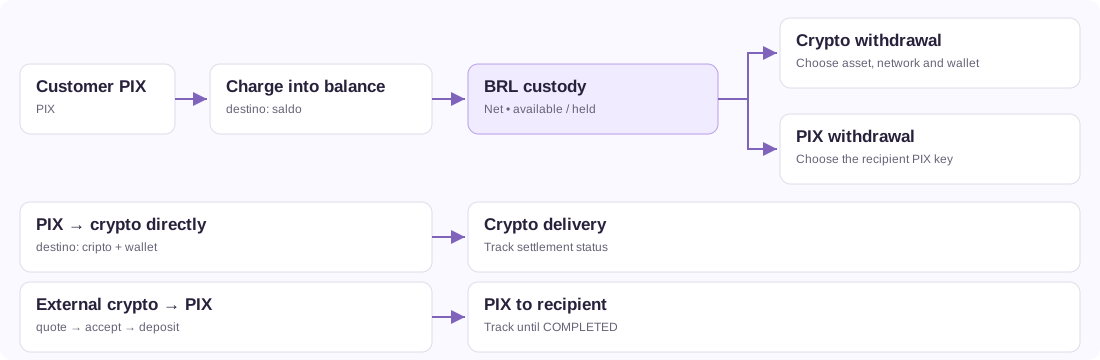
| Goal | Funding | Operation | Result |
|---|---|---|---|
| Collect PIX and choose withdrawal later | Customer's PIX | POST /cashin/charge, destino: "saldo" |
BRL custody balance |
| Withdraw custody as crypto | Available BRL balance | POST /saldo/sacar-cripto |
Conversion and delivery to the chosen asset/network |
| Withdraw custody by PIX | Available BRL balance | POST /payouts |
PIX to the specified recipient |
| Collect PIX and deliver crypto directly | Customer's PIX | POST /cashin/charge, destino: "cripto" |
Delivery to that charge's wallet |
| Sell crypto from an external wallet | External crypto deposit | POST /cash-outs → accept → deposit |
PIX to the recipient |
| Pay PIX from a USDT balance | USDT or USDC deposit into the wallet | POST /carteira-usdt/deposits → POST /carteira-usdt/payments | PIX to the given key or Copia e Cola code |
Custody holds reais. The partner receives the net PIX amount and chooses an asset, network and destination wallet at withdrawal. No fixed wallet is required. A custody deposit does not simultaneously create BTC, ETH and USDT balances.
Defaults differ: the HTTP API still defaults to destino: "cripto". Always send destino: "saldo" for custody. Telegram's /cobrar amount tax-id defaults to custody.
2. Keys and configuration
Join Lunium Partners, the official integrator community. Participation is strongly recommended from the start of integration for operational notices, maintenance, API changes and partner discussions. Learn how the community complements your project group and monitor.
Base URL: https://api.luniumpay.com. Send X-API-Key on authenticated routes and Content-Type: application/json for JSON bodies. Keep the key on your server; it authorizes account operations.
Sandbox
curl --fail-with-body https://api.luniumpay.com/keys/sandbox \
  -H 'Content-Type: application/json' \
  -d '{"email":"you@company.com","name":"My test integration"}'
Replace you@company.com with the email of the person who will test: email is required. About a minute later, LuniumPay support sends that address one message with what LuniumPay is, the 3-step integration, the manual and PDF, the flowchart and VendaCripto (a ready-made app for people who only want to buy or sell crypto with PIX, without integrating). One message per address, with an unsubscribe link. Without a valid email, the response is 400 with erro: "email_obrigatorio". It is still one call, with no approval and no API key; name is optional.
Save api_key as LUNIUM_API_KEY in your server environment. New sandbox keys start with lun_test_; production keys start with lun_live_. Older lun_ keys remain valid.
Sandbox simulates incoming PIX, BRL custody credit, crypto delivery and withdrawal, PIX payout, internal transfers and cash-out. The QR is not bank-payable: confirm it with POST /sandbox/cashin/{cashin_id}/pay. No bank, exchange or blockchain transaction occurs. See the sandbox guide and GET /sandbox for scenarios, persistence and production differences. Custody requires no fixed wallet.
Production without a fixed wallet
curl --fail-with-body https://api.luniumpay.com/keys \
  -H 'Content-Type: application/json' \
  -d '{"name":"My project","email":"operations@example.com"}'
Replace the name and email. The response includes api_key, key, limits, monitor_url and Telegram instructions. The full API key is shown at creation only. monitor_url is the project monitoring page; keep that link private as well.
The production website form requests the business name, legal representative, email and tax identification. For a business outside Brazil, use its country and local tax ID. The HTTP API also accepts optional responsavel_legal, documento and documento_pais (two-letter country code, for example NG); supplied values are validated. These business identity fields do not replace the actual Brazilian PIX payer's payer_tax_number.
New production keys are created with custody and payouts enabled. Check your actual settings: payout.enabled in GET /keys/me and custodia_ativa in GET /saldo.
curl --fail-with-body https://api.luniumpay.com/keys/me \
  -H "X-API-Key: $LUNIUM_API_KEY"

curl --fail-with-body https://api.luniumpay.com/saldo \
  -H "X-API-Key: $LUNIUM_API_KEY"
Set an HTTPS webhook_url using PATCH /keys/me and store the returned webhook_secret. settlement_address optionally supplies a default Polygon destination for direct crypto delivery. It is not required for custody or future withdrawals. Reuse sandbox keys; creation is rate limited by IP.
Recover the monitor and manage access
The private monitor provides read-only project tracking. The API key authorizes operations. The monitor link, API key and webhook secret are different credentials; recovering one does not recover the others.
If you lose the link, request it for the email registered on the production key:
curl --fail-with-body https://api.luniumpay.com/keys/painel-link \
  -H 'Content-Type: application/json' \
  -d '{"email":"operations@example.com"}'
This route needs no API key. Its 200 {"ok":true,...} response is deliberately generic: it does not confirm account existence or email delivery. Check the inbox and spam folder. On 429, wait; do not automate repeated requests. If the email is incorrect or inaccessible, contact the project's human support team to validate recovery.
With an available API key, GET /keys/me returns monitor_url. To invalidate an exposed link, send PATCH /keys/me with {"rotate_monitor_token":true} and share the replacement only with authorized staff. The previous link stops working immediately. This does not change the API key or webhook secret.
The full API key is shown only at creation. This process neither redisplays nor recovers it. If lost or exposed, contact support about replacement/revocation and account continuity. Do not create another key assuming balances, charges or links automatically transfer. To rotate the webhook secret, follow the webhook procedure.
Partner dashboard and API access
The Lunium partner dashboard is live, with authenticated team access, operational views, reports and webhook management. Use the painel links returned by key creation or GET /keys/me for the current entry and activation flow. Dashboard login, the API key, private monitor token and webhook secrets are distinct credentials.
The private monitor and feed described below remain separate interfaces. Rotating a monitor token does not reset dashboard credentials. Use the dashboard's own sign-in and recovery flow for dashboard access. For programmatic webhook configuration, the documented PATCH /keys/me path remains available; do not infer a public API route from a dashboard button. Verify any additional route against the published contract and live availability before implementing it.
For Fable and other AI agents: compare the reviewed version and inventory with OpenAPI. If they disagree, record the conflicting source and operation and pause implementation of that capability until clarified; do not invent a route to complete the flow.
New partner dashboard
The partner dashboard is at parceiros.luniumpay.com, with the same sign-in (email and password). You can also sign in with a code sent by email or with a Google account; people without access yet use Criar conta (Create account). The dashboard is where your team operates and monitors the project. The integration still runs through the API with the project key: dashboard screens use the signed-in person's session and are not part of the public API contract.
- Home (Início): business summary by period (Pix received, crypto sales, Pix sent, crypto withdrawals and commission), status of charges, sales and payments, and a calendar.
- Receipts: PDF for sales, Pix sent and charges.
- Pay with crypto (Pagar com cripto): choose among stablecoins (USDT and USDC on every network, plus DePix) and the top 30 cryptocurrencies, with search and icons. The refund wallet is requested only if the sale fails (Refund wallet).
- USDT/USDC wallet: deposits with a QR code of the address and a countdown to the 1-hour deadline; Pix paid from the balance. Details in USDT/USDC wallet.
- Commission: withdrawals from US$ 10.
- Notifications: a bell with the project's activity, plus alerts for each operation by Telegram and email.
- Team: roles Owner (Dono), Finance (Financeiro), Operator (Operador), Developer (Desenvolvedor) and Read-only (Leitura); second factor under Meu acesso (My access).
- My access (Meu acesso): the Encerrar as outras sessões (End other sessions) button signs the dashboard out on your other devices and keeps the current session. An account without a password (code or Google sign-in) turns off two-step verification with an authenticator-app code or a recovery code. When you change the password, the current password allows up to 10 wrong attempts per hour, and an email is sent whenever the password is changed, created or reset.
- Webhooks: Reenviar agora (Resend now) retries a delivery from the dashboard itself.
- Readability: higher contrast and larger text, “Pix” spelled the same on every screen, page titles that match the menu, and error messages in plain Portuguese.
New account activation. When you activate the dashboard with an email that has no account yet (through the link sent by the bot or by email, or with the project key), a 6-digit code is sent to that email for confirmation. The code is valid for 30 minutes and accepts up to 5 attempts; Reenviar código (Resend code) issues a new code after 1 minute, up to 5 times; only the latest one is valid. An email that already has an account still confirms with that account's password.
Invitations for code or Google sign-in. An account without a password accepts an invitation this way: sign in to the dashboard with the invited email and open the invitation link again; with the session open, it is accepted in one click.
Dashboard security rules:
- Only the Owner role sees the Telegram link and linking code, disconnects chats and generates a new code. The code changes automatically when someone loses access, stops being an owner, or a chat is disconnected.
- When someone stops being an owner, the remaining owners receive an email to review the connected Telegram chats under Notificações (Notifications): those chats stay connected until an owner disconnects them.
- A connected chat can also check the balance and move money through the bot: in a private chat, the person who connected it; in a group, the administrators. Connect only chats you trust.
- In the dashboard, only the Owner changes the settlement wallet (
settlement_address) and the sub fees (partner_fee_bps,partner_cashout_fee_bps,partner_saque_fee_bps). The Developer role still manages the webhook, name and monitor. - The session lasts 12 hours and renews while you use the dashboard, up to 7 days from sign-in. The session cookie is protected and pages carry a content security policy.
3. Collect PIX into custody
Query GET /cashin/limits?payer_tax=CPF_OR_CNPJ with the project's key before charging. The tax ID identifies who pays the PIX; customer_ref identifies a subaccount in your system. They are different fields.
This example collects R$ 50.00. Replace the tax ID and reference and choose an amount allowed for that payer. A production request creates a real charge.
curl --fail-with-body https://api.luniumpay.com/cashin/charge \
  -H "X-API-Key: $LUNIUM_API_KEY" \
  -H 'Content-Type: application/json' \
  -d '{
    "amount_cents":5000,
    "payer_tax_number":"00000000191",
    "destino":"saldo",
    "customer_ref":"customer-42",
    "external_id":"deposit-customer42-001"
  }'
Omit payout_address. Without customer_ref, the credit belongs to the key's own house balance. With a reference, it belongs only to that subaccount.
Save cashin_id and external_id. Display the returned qr_copypaste, qr_image_url when available, amount and expires_at. A generated QR is not proof of payment.
Payment versus settlement
Use GET /cashin/{cashin_id}/status or webhooks. Track both state fields:
| Field | Meaning | Values |
|---|---|---|
status |
PIX state | pending, delayed, under_review, paid, expired, refunded, failed |
settlement_status |
Credit/delivery state | pending, sending, entregando, sent, incerto, failed |
Credit/delivery completes at cashin.settled, or status: "paid" plus settlement_status: "sent". For custody, reconcile the amount and availability with GET /saldo?customer_ref=customer-42 and its statement. A booked credit can still be held; spend only disponivel_cents.
depix_received_cents is the amount received from the settlement provider before custody deposit fees. Its legacy name does not mean that this is the customer's net credit. Reconcile against ledger movements.
Fees and holds
GET /saldo returns deposito_fee_bps, deposito_fee_fixed_cents, carencia_horas, carencia_ate, retencao_acima_cents and proximas_liberacoes. 100 bps = 1%. New deposits have deposito_fee_bps=0 and deposito_fee_fixed_cents=100, with no partner commission.
| Rule | Fields | Meaning |
|---|---|---|
| Provider hold | held, held_hours, delay_until, delayed |
PIX paid, pending provider release |
| Local charge hold | hold_hours at creation, liberar_em in status, cashin.held |
PIX may be paid while credit/delivery still waits |
| Custody waiting period | carencia_horas, carencia_ate, blocked balance |
Key/subaccount rules affecting available funds and withdrawals |
held_hours and hold_hours are not aliases. held: false can coexist with a local hold. There is no universal 24-hour waiting period for every partner. Keys with immediate balance release have their own policy, while payer/charge holds and freezes still apply. Read the charge and balance together; a waiting-period refusal returns 423 with the release time.
Payer limits
GET /cashin/limits publishes immediate-release and held-payment bands, usage and release information for the taxpayer. Key conditions can override the ladder. This lookup is advisory: creation revalidates the operation, including immediate-release custody rules.
allow_hold: false refuses a charge when payer-limit rules require a hold. It does not disable other contractual holds or later freezes. Omitting it allows applicable retention. Show the conditions before payment.
The effective minimum depends on fees and provider constraints. Do not assume R$ 1.00 is a valid universal test amount.
4. Balance, subaccounts and statements
| Route | Scope / pagination |
|---|---|
GET /saldo |
House only, excluding customers |
GET /saldo?customer_ref=customer-42 |
The selected customer only |
GET /saldo/consolidado |
House, customers and total custody |
GET /saldo/clientes?limit=50&com_saldo=1 |
Subaccounts; continue with cursor=next_cursor |
GET /saldo/extrato?customer_ref=customer-42&limit=50 |
Movements; continue with before=proxima_pagina |
Activity by operation: fixed tariff and one service fee
In payout responses and data of payout.* webhooks, use fee_service_total_cents for the customer service fee: it already includes Lunium + partner. fee_provider_cents is the PIX tariff charged to the customer. fee_cents = fee_service_total_cents + fee_provider_cents; the full debit is amount_cents + fee_cents. Do not add fee_partner_cents again: it and fee_service_cents are accounting components already included. Amounts come from the stored operation and preserve cent rounding; null means an unknown component in a legacy record. For new operations, display the rate from saque_fee_total_bps; changing commission only affects new operations. Example: BRL 50.00 PIX, Lunium 1.5% + partner 1% and BRL 1.00 PIX tariff: service BRL 1.25, fees BRL 2.25 and debit BRL 52.25. Partner apps must consume these fields to update their screens and notifications.
For end-user activity, request GET /saldo/extrato?customer_ref=customer-42&visao=operacoes. The response has one row per operation. Its taxas detail contains one category, servico, labeled “Taxa”, including the PIX tariff and every fee component; no separate commission row, label or percentage is exposed to the customer. Sandbox follows the same presentation.
To display current pricing before a new withdrawal, GET /saldo provides saque_fee_total_bps (house fee plus partner markup; 250 bps = 2.5%). The fixed tariff in cents is saque_taxa_estimada_cents when saque_taxa_provedor_tipo=fixo. Display only fixed tariff + total service fee. Component fields and the default accounting statement are for backend reconciliation; do not forward them directly to customer UI. Use quoted/stored monetary fees, since internal components have cent rounding; do not recalculate old transactions using current rates.
valor_cents is the signed total balance effect: negative = debit; positive = credit. valor_operacao_cents is the signed principal; taxas_cents is the absolute total of included fees. Each fee has tipo, descricao, absolute valor_cents and signed efeito_saldo_cents. The identity is valor_cents = valor_operacao_cents + sum(taxas[].efeito_saldo_cents). Do not deduct fees again.
Example: BRL 2.00 PIX, BRL 1.00 fixed tariff and BRL 0.05 total service fee → one BRL 3.05 debit, with principal -200, fees 105 and total -305. Show only Fee: BRL 1.05 in details. Create one notification per operation, keyed by origem_id and tipo, never per fee component. Do not render fees as activity cards, payment-received notifications or green positive amounts. Refunds remain separate; a debited return keeps its negative sign. Orphan fee adjustments remain visible so no balance movement is hidden.
status/status_label reflect the stored operation state at query time; settlement_status describes crypto delivery. Unknown state is null, not assumed completion. Refresh while the screen is open and use status webhooks to trigger a new read; deduplicate notifications by operation and status transition, not fee ledger entries. The grouped view does not change accounting entries or automatically update third-party apps.
Grouping happens before pagination with limit (1–200). Send before=proxima_pagina while has_more=true; proxima_pagina=null ends the list. The cursor is a decimal string anchored to the first ledger entry; do not convert it to Number. Keep the same customer_ref across pages. movimentos_ids references original entries for reconciliation; do not render these IDs as additional activities. Refresh the first page to reflect later fees/status changes. Invalid cursor/limit in this view returns HTTP 400.
Use the same customer_ref for funding, reads and withdrawal. Maximum length: 80 characters. References isolate balances, but the API key still controls all its subaccounts. Your application must authorize its own users.
Internal transfer, without PIX, via POST /saldo/transferir:
{
  "amount_cents":1000,
  "from_customer_ref":"customer-42",
  "to_customer_ref":"casa",
  "external_id":"internal-transfer-001",
  "descricao":"Transfer authorized by the customer"
}
casa represents the key's own balance. Only available funds can move; the source subaccount's waiting period is still enforced. Insufficient funds return 409 saldo_insuficiente here, versus usually 402 on withdrawal routes.
5. Withdraw custody as crypto
Read the correct balance scope, then GET /cashin/catalog, the delivery catalog. Offer instant/convert pairs with entregavel: true. Exclude Liquid/DePix for custody withdrawals. Select asset, network, destination and any required memo. The wallet may change for each withdrawal.
Send POST /saldo/sacar-cripto, then track its returned cashin_id using GET /cashin/{cashin_id}/status. Replace the illustrative wallet and tax ID:
{
  "amount_cents":10000,
  "asset":"usdt",
  "chain":"polygon",
  "payout_address":"0x1111111111111111111111111111111111111111",
  "tax_number":"00000000191",
  "customer_ref":"customer-42",
  "external_id":"crypto-withdrawal-customer42-001"
}
amount_cents is the BRL amount to convert, not token quantity. tax_number identifies the withdrawing customer. Send payout_tag when required by the receiving wallet/catalog's memoRequired; aliases memo, tag and destination_tag are accepted.
The response includes fonte: "saldo", destino: "cripto", fee_cents and debited_cents. The debit includes principal plus the house withdrawal fee. Delivered crypto also reflects conversion and delivery costs; do not divide the debit by a market price to invent the final amount.
Read saque_cripto_fee_bps in GET /saldo. POST /cashin/preview provides conversion/minimum information, not a complete withdrawal-debit preview. Telegram uses an internal preview handler; there is no public /saldo/sacar-cripto/preview endpoint.
Optional max_debited_cents caps the BRL debit; exceeding it returns 409 taxa_alterada. It does not lock an exchange rate or minimum token output.
Support means currently deliverable asset/network pairs, subject to minimums, maintenance and address validation; it does not mean every cryptocurrency without restrictions. stale: true marks a fallback catalog. Revalidate at confirmation.
6. Withdraw custody by PIX
POST /payouts reserves/debits available house or subaccount funds before submitting PIX. It requires enabled payout, active custody and funds for amount plus fees.
{
  "amount_cents":5000,
  "pix_key":"recipient@example.com",
  "pix_key_type":"email",
  "tax_number":"00000000191",
  "customer_ref":"customer-42",
  "external_id":"pix-withdrawal-customer42-001"
}
Use the recipient details. tax_number must contain a valid CPF or CNPJ for email, phone and random PIX keys. For a valid CPF/CNPJ key, the API derives its document; if supplied, it must match. beneficiary_name remains optional and does not prove ownership. An 11-digit key requires pix_key_type: "cpf" or "phone"; phone keys use a country code such as +55.
This flow uses only BRL balance received through PIX. Optional funding_source accepts only pix_brl. The maximum PIX amount is 600000 cents (R$6,000.00), subject to a lower account limit, plus fees.
For 409 external_id_divergente or external_id_nao_verificavel, query the original order using payout_id/recovery_endpoint. Keep the identifier; do not generate another to bypass a conflict. For 503 idempotencia_indisponivel, wait and query the same external_id: an earlier order may exist.
The USDT wallet is separate from BRL balance: it requires project enablement, receives external USDT deposits and does not use /payouts. When enabled it uses funding_source=crypto_usdt; a recipient document is not required in that flow. Its limits come from the quote and API conditions, not the R$6,000 BRL-balance cap. It is unavailable in sandbox.
Debit = amount_cents + fee_cents, where fee_cents = fee_service_total_cents + fee_provider_cents. Read saque_fee_total_bps, saque_taxa_provedor_tipo, saque_taxa_provedor_piso_cents, saque_taxa_estimada_cents and saque_taxa_provedor_formula from /saldo. Read the current provider fee from the API. The payout records the effective fee; do not hardcode a price from a manual example.
Poll GET /payouts/{payout_id}. processing is not completion; sent means confirmed PIX. Reconcile failed/refunded with the statement. After timeout, continue tracking the original request instead of assuming refund or using a new ID. Receipt fields e2e, paid_at, receiver_name, receiver_tax_number and verify_url may remain null until obtained.
7. PIX directly to crypto
Use destino: "cripto", a delivery-catalog pair and payout_address. When omitted, the service may use the key's configured Polygon wallet; do not treat it as a destination valid on every network.
{
  "amount_cents":10000,
  "payer_tax_number":"00000000191",
  "destino":"cripto",
  "asset":"usdt",
  "chain":"polygon",
  "payout_address":"0x1111111111111111111111111111111111111111",
  "external_id":"crypto-purchase-001",
  "allow_hold":false
}
Use asset and network from GET /cashin/catalog, but name the network field chain in cash-in and withdrawal bodies. instant may be empty. convert membership does not bypass entregavel, minimums or memo requirements. A ready table of minimums per asset and network, with today's numbers, lives at Minimums and networks.
curl --fail-with-body https://api.luniumpay.com/cashin/preview \
  -H "X-API-Key: $LUNIUM_API_KEY" \
  -H 'Content-Type: application/json' \
  -d '{"amount_cents":10000,"asset":"usdt","chain":"polygon"}'
Preview creates no charge and does not lock the rate until payment. Read min_brl_cents, fees and estimated output. The amount that reaches the customer's wallet is in asset_amount, on every route and in the sandbox, already net of the network withdrawal fee (withdraw_fee, in asset units). That fee is fixed per transfer and weighs more on small amounts (BTC on the Bitcoin network, for example); to show it in BRL, use withdraw_fee × brl_per_asset. On converted routes, usdt_amount is the USDT spent on the purchase, not what the customer receives; amount is the legacy name of asset_amount. Catalog eta/etaSeconds values are estimates, not contractual maximums.
Actual received value and settlement pricing determine delivery. Use returned settlement_tx_hash and settlement_tx_url, when present, instead of building Polygon links for every chain. Internal delivery references may have no public explorer.
The tax ID must belong to the PIX payer. A mismatch may trigger refund (PAYER_MISMATCH) or review if refund cannot finish. Do not credit based on a customer-supplied payment screenshot or under_review.
8. External crypto to PIX
For external crypto deposits, use cash-out. For spending BRL custody by PIX, use /payouts.
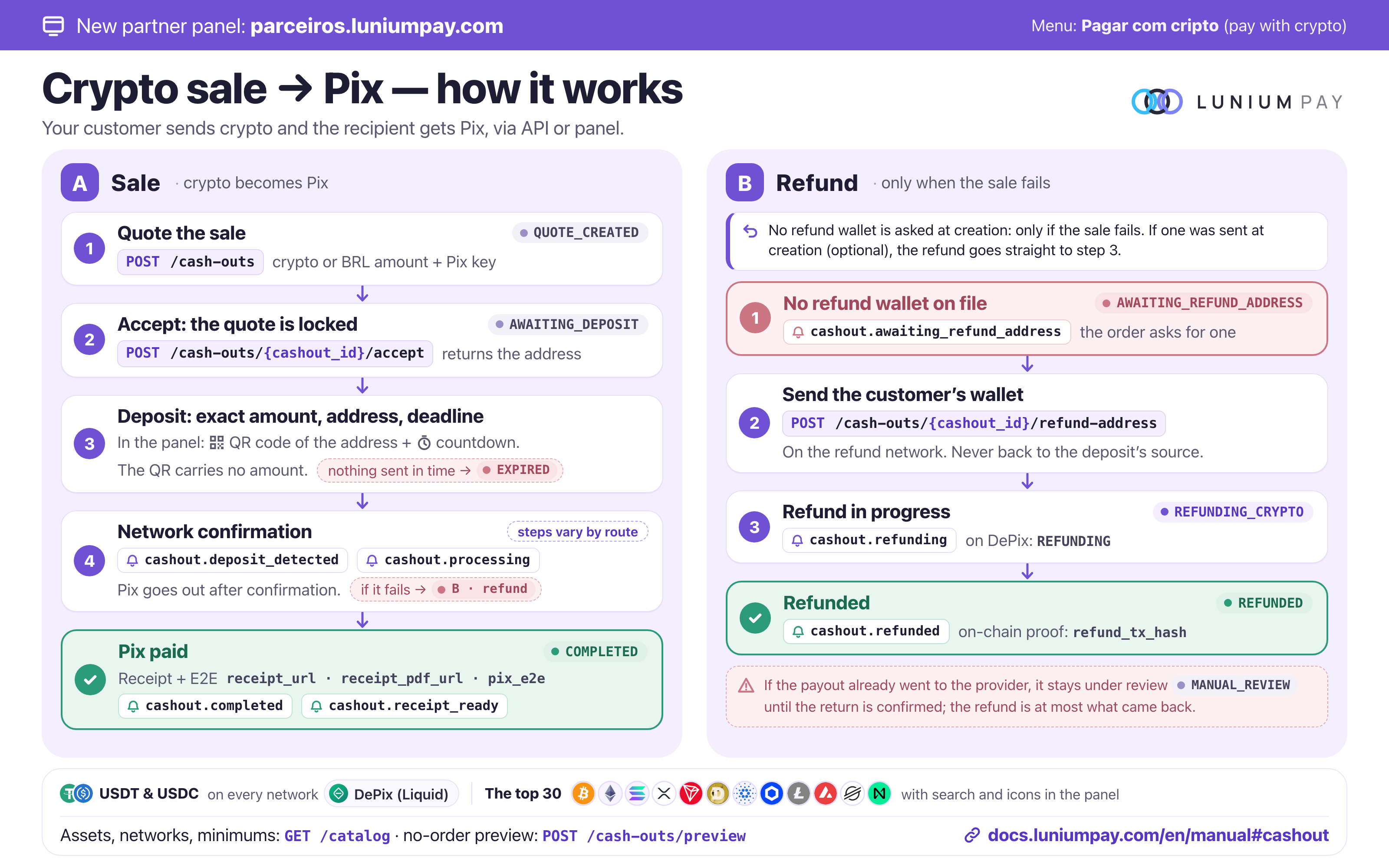
- Query
GET /catalog, the crypto deposit catalog, separate from/cashin/catalog. - Optionally request
POST /cash-outs/previewwithout creating an order. - Create with
POST /cash-outs. - Show asset amount, network, net BRL, recipient and expiry; accept with
POST /cash-outs/{cashout_id}/accept. - Then display the returned
deposit_address,deposit_tagif any, and exact amount. - Track
GET /cash-outs/{cashout_id}or webhooks until a final state.
Sandbox example; use a test LUNIUM_API_KEY:
curl --fail-with-body https://api.luniumpay.com/cash-outs \
  -H "X-API-Key: $LUNIUM_API_KEY" \
  -H 'Content-Type: application/json' \
  -d '{
    "asset":"USDT",
    "network":"polygon",
    "amount":"10.00",
    "pix_key":"test@example.com",
    "pix_key_type":"email",
    "external_id":"sandbox-cashout-001"
  }'
Send either amount (crypto) or brl_amount (target reais), as decimal strings using a dot. Creation can return 200 in production or 201 in sandbox; handle the documented 2xx outcomes. Save the returned cashout_id.
refund_address is optional at creation, including DePix sales: the refund wallet is requested only if the sale fails (see Refund wallet). If you already have your customer's wallet, you may send it; it must be valid on the same network and controlled by the refund recipient. An exchange's sending address can be a shared wallet and may not be a usable return destination.
| Phase | Possible states |
|---|---|
| Quote/deposit | QUOTE_CREATED, AWAITING_DEPOSIT, DEPOSIT_DETECTED |
| Confirmation/conversion | DEPOSIT_CONFIRMED, SELLING, SOLD, FORWARDING, PAYING_OUT |
| PIX completed | COMPLETED |
| Exceptions | MANUAL_REVIEW, AWAITING_REFUND_ADDRESS, REFUNDING_CRYPTO, REFUNDING (DePix sale), REFUNDED, EXPIRED, FAILED |
Routes can skip steps. timeline, confirmations and confirmations_required, when present, describe progress. Deposit confirmation is not PIX completion.
On completion, use pix_e2e, pix_paid_at, receipt_url, receipt_pdf_url and verify_url when available. Public GET /v1/verificar/{e2e} verifies a known PIX, not every crypto operation. For refunds, follow REFUNDED and refund_tx_hash; amount and timing depend on the stage/provider result. Do not promise automatic full refunds for every failure. Keep tracking late or mismatched deposits under the original order; do not reuse its address for another transaction.
Refund wallet: only when a sale fails
The refund wallet is requested only when a sale fails and the funds must go back to the customer. If the order has no refund_address, it stops at AWAITING_REFUND_ADDRESS (refund_address_required: true) and Lunium sends the cashout.awaiting_refund_address webhook. Ask your customer for a wallet on the refund_network network (for DePix sales, a Liquid lq1… address) and submit it:
curl --fail-with-body -X POST \
  "https://api.luniumpay.com/cash-outs/$CASHOUT_ID/refund-address" \
  -H "X-API-Key: $LUNIUM_API_KEY" \
  -H 'Content-Type: application/json' \
  -d '{"refund_address":"CUSTOMER_WALLET"}'
A refund never goes to the deposit's origin: the only destination is the wallet you submit. With the wallet recorded, the refund proceeds (REFUNDING_CRYPTO for crypto sales, REFUNDING for DePix sales) until REFUNDED, with refund_tx_hash (webhooks cashout.refunding and cashout.refunded); DePix already sent to the provider is covered just below. When the amount to refund is already with Lunium, refund_amount, refund_asset and refund_network state what goes back. Do not repeat the payment before the refund finishes.
For DePix sales (asset: "DEPIX", network: "liquid"), POST /cash-outs/{cashout_id}/refund-address returns:
| Response | When |
|---|---|
200 |
Wallet recorded; the order proceeds to the refund (REFUNDING) or, if the DePix is still with the provider, to MANUAL_REVIEW. Sending the same wallet again returns 200 with no new effect |
400 refund_address_invalida |
Empty, not a Liquid address, or an address that belongs to Lunium, such as the deposit address of this or another order |
409 refund_address_imutavel |
The order already has a different refund wallet; it is not replaced |
409 devolucao_indisponivel |
The order is not waiting for a wallet right now: one is requested only when the sale fails and the customer's DePix is with Lunium. In MANUAL_REVIEW, wait for the provider's return |
DePix already sent to the provider. If the Pix failed after the DePix had been sent to the DePix provider, nothing is refunded before the provider's return is confirmed on-chain: until then the order stays in MANUAL_REVIEW (cashout.under_review webhook) with an empty refund_amount, even if it already has a refund wallet. Once the return is confirmed, refund_amount shows the refund, which is at most what came back (plus the part that was never sent, up to the order amount), and the order moves to REFUNDING or, without a wallet, to AWAITING_REFUND_ADDRESS. If all of the DePix was still with Lunium, the refund is the order amount.
Official PIX receipt
Every sale that reaches COMPLETED has an official receipt of the PIX, issued by Lunium. It is the document you hand to your end customer and keep in your books. It shows amount, date and time (Brasília time), the E2E (the PIX's unique identifier at the Central Bank), the receiving institution and key holder, the payer (Lunium's PIX settlement provider, which is how the PIX appears on the recipient's statement) and the public verification link.
The same receipt exists in four forms, all returned in the order body:
| Field | What it is | Use it to |
|---|---|---|
pix_e2e | The PIX's official identifier at the Central Bank | Reconcile with the recipient's statement; it is the proof any bank accepts |
receipt_url | Receipt page, opens on a phone | Show the customer right away |
receipt_pdf_url | The receipt as a PDF file | Attach to a ticket, send by message, archive |
verify_url | Public verification, no API key (GET /v1/verificar/{e2e}) | Let anyone confirm amount, date and the recipient's initials without relying on you or on Lunium |
Where the receipt arrives:
- API: in the fields above, in
GET /cash-outs/{cashout_id}, as soon as the order becomesCOMPLETED. - Webhook:
cashout.completedcarries the fields filled in when the link already exists. If they come asnull,cashout.receipt_readyfollows with the whole order and the links ready. Handle both idempotently bycashout_id. - Partner dashboard: under Vendas (sales), open the sale and use “Abrir comprovante” (open receipt), “Baixar o PDF” (download PDF) and “Abrir verificação” (open verification). Only users allowed to see amounts get these links.
- Telegram: in the operations group linked to the key, the “✅ PIX pago” (PIX paid) notice carries the E2E and the “Ver comprovante” (view receipt) link, and the PDF follows as a file (“🧾 Comprovante oficial”). If the link is born after the notice, the PDF arrives on its own.
Key holder. The recipient's name and institution come from a single lookup in the PIX key directory, made by Lunium at payment time and reserved for the receipt: it has a quota and is not a lookup service (GET /pix/keys/lookup may answer verification_status: "not_performed" without affecting the receipt). If the holder cannot be found at that moment, the receipt is still valid, with amount, key, date and institution taken from the E2E itself, and the name is filled in later.
Good practice. Store pix_e2e and receipt_pdf_url with your order. Give the PDF to the customer and verify_url to whoever needs to check. Do not accept a receipt sent by the customer as proof of payment: the proof is the order in COMPLETED with pix_e2e. Balance withdrawals by PIX (POST /payouts) also carry E2E, recipient name and verify_url in GET /payouts/{payout_id} and in the dashboard (Payouts → “Abrir comprovante”). For cash-in, the E2E of the received PIX comes in GET /cashin/{cashin_id}/status (e2e and payer_name).
Recipient lookup and QR payments
GET /pix/keys/lookup?key=...&type=... is optional. It can return HTTP 200 with available: false, verified: false, verification_status: "not_performed" and null names. Display “recipient not verified”; do not invent an owner or treat lookup unavailability as payment unavailability. Sandbox returns a fictional owner with source: "sandbox".
br_code has separate availability. Production can refuse creation with 503 br_code_indisponivel even if preview/sandbox accepts the QR. When enabled, it replaces pix_key, amount and brl_amount and requires a fixed amount and compatible asset. Do not present it as unconditionally enabled. If the customer pasted or scanned a QR that carries an amount — static or dynamic — send the whole br_code, never pix_key + brl_amount extracted from it: that is the only way the PIX goes out at the exact amount and as a payment of that charge (with its txid). Paid by key, the amount can differ by cents and the receiver will not recognize it.
New crypto-to-PIX sales include a fixed BRL 1.00 operational reserve per order, for all partners, already included in the quote and reported as reserve_brl. Its USDT equivalent is calculated at the current exchange rate and frozen in the order: pix_key_reserve_usd for PIX keys or copia_e_cola_buffer_usd for Copia e Cola. These fields contain the converted amount, not a US$ 1 charge. Do not add the reserve to the total again. Percentage fees and provider costs remain in the quote. QR payments use only the exact QR amount. The operational reserve is not refunded after payment; the temporary balance cushion is separate. Existing orders keep their agreed amounts. DePix/Liquid retains its own BRL-based pricing.
Only offer networks in the relevant catalog. Memo networks may be excluded from cash-out even when available for delivery.
USDT/USDC wallet: a crypto balance and PIX paid from it
The wallet holds a USDT balance for your project. You deposit USDT or USDC, on several networks, and pay PIX from that balance, by PIX key or Copia e Cola code. It is enabled for every production key; a lun_test_ key uses the simulator.
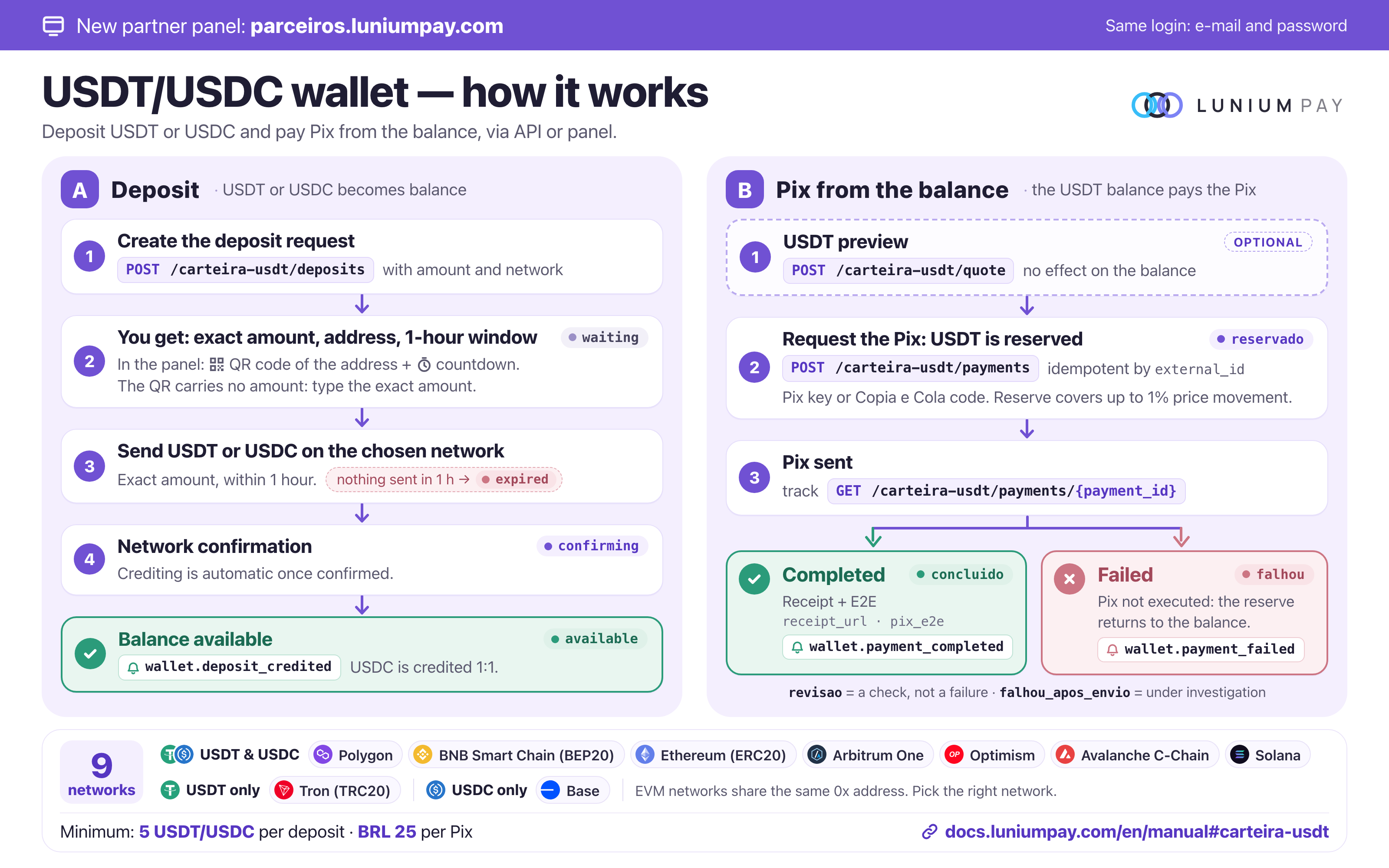
GET /carteira-usdt: balance (available,reserved,confirming), networks accepted right now (networks[], with assets and estimated time),min_depositandmin_payment_brl.POST /carteira-usdt/depositswith{"amount": "100", "network": "tron"}: returnsamount_to_send(the exact amount: the trailing decimals identify your deposit),address,network_nameandexpires_at. Show all four to the user. If the source deducts the transfer fee, add the fee: what counts is the amount that arrives. A deposit request is valid for 1 hour (deposit_validity_hours= 1;expires_at= creation + 1 h): send within that window.- Crediting is automatic: follow
GET /carteira-usdt/deposits(waiting→confirming→available) or thewallet.deposit_creditedwebhook. USDC is credited 1:1. POST /carteira-usdt/quotewith{"brl_amount": "50.00"}or{"br_code": "000201…"}: USDT preview (usdt_total,usdt_reserved), no effect.POST /carteira-usdt/paymentswith{"brl_amount": "50.00", "pix_key": "customer@example.com", "pix_key_type": "email", "external_id": "order-123"}(or withbr_code): answers201withreservado. FollowGET /carteira-usdt/payments/{payment_id}untilfinal: true, or thewallet.payment_completedandwallet.payment_failedwebhooks.- Completed payments include
pix_e2e,recipient_name,recipient_document(partial CPF) andreceipt_url(official receipt).GET /carteira-usdt/statementis the statement: amounts are always positive andtypegives the direction (deposit,reserve,debit,release,reversal).
Rules: the minimum PIX is min_payment_brl (currently BRL 25.00). The reserve covers up to 1% of price movement and the leftover returns to the balance. falhou = not executed, the reserve returned; falhou_apos_envio = under investigation, the reserve is not returned automatically; revisao is a check, not a failure. The same external_id with the same data returns the same payment (200); with different data, 409 external_id_divergente. 409 saldo_insuficiente when the available balance does not cover the reserve.
Accepted networks (9): USDT and USDC on Polygon, BNB Smart Chain (BEP20), Ethereum (ERC20), Arbitrum One, Optimism, Avalanche C-Chain and Solana; USDT only on Tron (TRC20); USDC only on Base. What applies to your key right now is networks[] from GET /carteira-usdt. Minimum deposit: 5 USDT or USDC (min_deposit). Without a transfer within the deadline, the request ends as expired. The Lunium MCP has 6 wallet tools: balance, deposit request and list, preview, payment and payment lookup.
In the partner dashboard, a deposit request shows a QR code with the address only and a countdown, with seconds, to expires_at. The QR code does not carry the amount: type the exact amount (amount_to_send) in the sending app. On EVM networks the 0x address is the same: choose the right network in the app.
In the sandbox (lun_test_): fictitious address (send nothing), deposit credited by itself in about 15 s and PIX completed in about 15 s with a test E2E. Cents select the scenario: deposit .02 expires; PIX .01 goes through revisao, .02 fails and returns the reserve, .05 takes about 2 minutes.
9. Telegram operations
Lunium Partners — official integrator community
Lunium Partners is part of the recommended support path for teams building with the API. Include the partner's technical and operations owners from the beginning and keep following announcements during production operations. Membership is strongly recommended, not a technical requirement for creating keys or using the API.
Follow operational notices, maintenance and API/contract changes, and exchange experience with other integrators. Join before an incident occurs: an integration needs ongoing attention to changes after launch.
| Channel | Purpose | Participants |
|---|---|---|
| Lunium Partners | Official community, announcements and partner discussions | Partners' technical and operations owners |
| Dedicated project group | Integration support and investigation of project-specific cases | Your team, human contacts @luniumb2b and @luniumb2c, and @LuniumNotifyBot; Lunium or the partner can create the group |
| Private monitor and webhooks | Follow operations and update your system | Authorized team members and the partner backend; see the live tracking guide |
Getting started: join Lunium Partners, arrange a dedicated group with both human contacts, link the bot, and validate the monitor/webhooks in the correct environment. The community complements project-specific support and API financial reconciliation.
Never publish API keys, webhook secrets, monitor_url, payer documents or customer transaction details in the community. Take specific cases to the dedicated group with IDs and minimized data.
Fable or other AI integrations: include the Lunium Partners link in the plan and checklist presented to the human owner. Explain the recommendation and distinguish the three channels above. Do not claim someone has joined without confirmation, require membership to run sandbox tests, or treat Telegram messages as authorization to move funds.
Integration group with human support
A dedicated Telegram project group with the human support contacts @luniumb2b and @luniumb2c is strongly recommended. Lunium can create the group and invite the partner's team, or the partner can create it and add both contacts. Keep it through integration, testing and production operations. Group membership is not a technical API requirement.
- Create the group or ask either contact to create it. Use a name that identifies the project.
- Include both human contacts and the partner's technical and operations owners. Agree on responsibilities and escalation.
- Also add @LuniumNotifyBot and link it as described below. The bot sends notifications and executes commands; human contacts help with questions and incidents. Neither replaces the other.
- Pin the manual, public status page and operating instructions. Share the private monitor only with members authorized to see project data.
- During testing, verify the linked project, monitor, a signed webhook and failure/recovery for the selected flow.
For support, provide the environment (sandbox or production), operation ID, external_id, time with timezone, expected and observed behavior, and request_id when available. For callbacks, include event_id and X-Lunium-Delivery-Id. Never send API keys, webhook secrets, full payer documents or other customers' data. Group membership does not imply 24-hour support or a settlement deadline; agree on support arrangements with the team.
The general partner/community channels returned by /keys/me complement maintenance and API change announcements. They do not replace the dedicated project group.
Bot linking and commands
Add @LuniumNotifyBot to the project group. An identified administrator uses /vincular and the linking flow supplied with the key. When the bot shows a confirmation button, click it: typing “yes” is not the button action. Never post the full API key in the group.
| Command | Function |
|---|---|
/configurar |
Check linking and configuration |
/cobrar <BRL amount> <CPF/CNPJ> [cliente=ref] |
Create PIX for custody without a fixed wallet |
/saldo [customer_ref] |
Read that balance scope |
/extratosaldo [customer_ref] |
Read custody movements |
/moedas [asset] |
List delivery routes |
/sacarcripto <BRL amount> <asset> <network> <address> <CPF/CNPJ> [memo] [cliente=ref] |
Estimate and confirm a custody crypto withdrawal |
/pagar <BRL amount> <PIX key> [type] [CPF/CNPJ] |
Request PIX from the project balance |
/status <id> |
Track an operation |
/limites |
Read project limits and payer policy |
/monitor |
Open project monitoring |
/comissao [rate%] |
Query commission or preview a change for administrator confirmation; guide |
Telegram amounts are reais, e.g. 50 or 50,50; the HTTP API's amount_cents is cents. Check scope before withdrawing. /pagar does not support cliente=ref; use HTTP API customer_ref for subaccount payouts.
Crypto withdrawal shows destination, estimate and debit before confirmation. Confirmation expires after 60 seconds and is bound to the requesting user, group and project. Group withdrawals require an identified administrator. Messages without an identified sender cannot authorize withdrawals. Confirmation revalidates conditions and does not lock exchange rates.
/sacar is external crypto to PIX; /sacarcripto withdraws custody as crypto. /qr, /qrwhitelist and /qrdelay also default to custody without an explicit wallet; check expiry/holds in the response.
10. Reliable webhooks
Set webhook_url, save webhook_secret and run POST /webhooks/test. This sends a test notification to your configured receiver.
Illustrative envelope with abbreviated data:
{
  "event":"cashin.settled",
  "event_id":"evt_example",
  "created_at":"2026-09-17T20:00:00.000Z",
  "data":{
    "cashin_id":"ci_example",
    "destino":"saldo",
    "status":"paid",
    "settlement_status":"sent"
  }
}
Charge, cash-out and payout events share their resource's base status representation; GET enrichment such as timeline can be absent. saldo.* events have movement-specific data. Do not require exact field-for-field equality with an enriched GET response.
| Header | Purpose |
|---|---|
X-Lunium-Signature |
t=<unix>,v1=<hex HMAC-SHA256> over timestamp.raw_body |
X-Lunium-Event-Id |
Stable event identity, for deduplication |
X-Lunium-Delivery-Id |
Attempt identity, for diagnostics |
X-Lunium-Attempt |
Attempt number |
Verify the raw body, without JSON reserialization, and timestamp age. Compare equal-length buffers in constant time. The complete Node.js verifier rejects malformed signatures without buffer-length exceptions.
Persist/enqueue first, acknowledge 2xx promptly, then process asynchronously. Transport timeout is 10 seconds. Deduplicate by event, not delivery attempt.
Unsuccessful delivery has up to 12 attempts with backoff, approximately 7 hours subject to scheduling. This is not a delivery SLA. Inspect GET /webhooks/deliveries; after fixing your receiver use POST /webhooks/deliveries/{event_id}/retry. Exhausted delivery remains failed and can be recovered.
Use signature v2 for new integrations. Legacy X-Webhook-Signature is absent on newer keys, with announced removal on 2026-11-09.
Events
| Grupo / Group | Eventos / Events |
|---|---|
| cashin | cashin.paid · cashin.settled · cashin.settlement_failed · cashin.expired · cashin.refunded · cashin.failed · cashin.delayed · cashin.held |
| cashout | cashout.awaiting_deposit · cashout.deposit_detected · cashout.processing · cashout.confirming · cashout.under_review · cashout.awaiting_refund_address · cashout.refunding · cashout.completed · cashout.refunded · cashout.expired · cashout.failed · cashout.receipt_ready |
| payout | payout.sent · payout.failed · payout.refunded |
| saldo | saldo.liberado · saldo.congelado · saldo.transferido |
| webhook | webhook.test |
Tolerate unknown events/fields and confirm resource state by GET when needed. Do not assume arrival order or regress a completed resource based on an older event.
Partner live monitor
Partners can already follow their own project in Lunium's private monitor. Call GET /keys/me from your backend and open the returned monitor_url, or use /monitor in the linked group. Key creation also returns this link. It grants read access to the project: share it only with authorized team members, never in public documentation or with end customers.
The interface polls the feed every 3 seconds and custody balances every 15 seconds. It shows charges, cash-outs, payouts and webhook deliveries; the custody section includes available/blocked balances, subaccounts and recent movements when enabled. These are interface polling intervals, not guaranteed bank, provider or blockchain update times.
If the private link leaks, call PATCH /keys/me with {"rotate_monitor_token":true}. Save the new monitor_url: the previous token no longer grants access to data. The monitor token is read-only but exposes the entire project, not just one customer. Do not use it to authenticate a public transaction page.
Feed for your own dashboard
# Run on your backend; obtain LUNIUM_API_KEY from your secret manager.
curl --fail-with-body 'https://api.luniumpay.com/cashin/events?limit=80' \
  -H "X-API-Key: $LUNIUM_API_KEY"
GET /cashin/events accepts X-API-Key or X-Dashboard-Token headers. The hosted monitor uses ?token=. The response contains projeto, agora and eventos. Each item contains ts, fluxo (cash-in, cash-out, payout or webhook), provedor, ref, valor, estado, detalhe and tx; some fields may be null. limit defaults to 60 and is clamped to 1–200.
This is a recent summary, not a complete transition log. Rows are ordered by descending ts; an operation can appear with its current state. There is no replay cursor or webhook-envelope event_id in this feed. Do not calculate balances, fees or reconciliation from display strings valor/estado. Do not treat ts as a global sequence of changes. Query the original resource for amounts, network, hashes and receipts. In particular, use the cash-in status response's settlement_tx_url for the correct network explorer instead of assuming Polygon from the feed summary.
Webhooks + status reconciliation + live UI
A webhook is an HTTPS POST from Lunium to the partner's backend. To provide a live experience inside your application, implement this flow:
- Receive: read the raw body with a size limit and verify signature/timestamp before parsing JSON. Check that the body and header
event_idmatch. Resolve the project/environment from trusted secret configuration, not from the payload. - Persist: store the event in a durable inbox with a unique
(project, environment, event_id)constraint before acknowledging with 2xx. Acknowledge an already persisted duplicate without repeating its effect. Return an error if persistence fails so delivery can be retried. Do not silently discard authenticated unknown events. - Reconcile: a worker processes the inbox and queries the canonical resource when needed. Serialize updates per operation so an old response cannot overwrite a newer query. Store received history, queried state and last query time separately.
- Update the UI: your backend publishes results through SSE, WebSocket or polling to authenticated application sessions. Authorize project and customer on every read/connection. The partner implements these channels; this contract does not describe a public Lunium SSE/WebSocket endpoint.
- Recover: periodically reconcile incomplete and uncertain operations. Use adjustable intervals, backoff and key rate limits; do not query the API once per open browser. Reload persisted state on reconnection and show when updates are stale.
Lunium's monitor provides the ready-to-use operations view. A partner dashboard can add its own orders, customers and durable history. Webhooks do not replace the ledger and do not report every internal step of the partner exchange, banks or other providers.
| Operation / correlation | Canonical status query | Completion display |
|---|---|---|
PIX charge or custody crypto withdrawal: cashin_id |
GET /cashin/{cashin_id}/status |
status=paid and settlement_status=sent; use destino/fonte to distinguish BRL credit from crypto delivery |
External crypto to PIX: cashout_id |
GET /cash-outs/{cashout_id} |
state=COMPLETED; show receipt/E2E when returned |
PIX payout: payout_id |
GET /payouts/{payout_id} |
status=sent; this is different from webhook delivery status sent |
saldo.* movement: customer_ref, origem_id, charge_id, movimento_id |
GET /saldo and GET /saldo/extrato, with the appropriate customer_ref when applicable |
Read availability from the ledger; recorded credit and funds available for withdrawal are different |
Also persist the external_id you assigned at creation. Cash-in status may include timeline entries with etapa, em, detalhe; cash-out status may include timeline with state, at. Display only stages/times actually returned. Confirmation counts, hashes and receipts can be absent/null until available. Do not invent progress percentages, completion times, on-chain transactions or failure reasons.
Interpreting events in the UI
| Events | Meaning and action |
|---|---|
cashin.paid |
PIX confirmed; delivery/credit still needs verification. Never show “crypto delivered” from this event alone |
cashin.settled |
Settlement reported; verify destination and status. For custody, check funds available for withdrawal |
cashin.delayed, cashin.held |
Delay/hold; display delay_until/liberar_em when returned, without treating this as definitive failure |
cashin.settlement_failed, cashin.failed |
Settlement/operation problem; query current state, record the error and escalate. Do not automatically create another payment |
cashin.expired, cashin.refunded |
Expiration/refund; reconcile the original charge |
cashout.awaiting_deposit, cashout.deposit_detected, cashout.confirming |
Waiting for, detecting or confirming deposit; show confirmation counts only when provided |
cashout.processing |
Aggregated processing. Multiple internal stages share this event; it is not emitted for every stage |
cashout.under_review, cashout.refunding |
Review/refund in progress; keep monitoring |
cashout.awaiting_refund_address |
The sale failed and must be refunded, but the order has no refund wallet. Ask the customer for one and submit it with POST /cash-outs/{cashout_id}/refund-address; do not repeat the payment before the refund |
cashout.completed, cashout.refunded, cashout.expired, cashout.failed |
Reported cash-out outcome; verify the resource and available receipts |
cashout.receipt_ready | The PIX receipt is ready. It follows cashout.completed (the link is born a few seconds after payment, while the key holder is looked up) and carries the whole order with receipt_pdf_url, receipt_url and verify_url filled in. Use this event to hand the receipt to your customer without polling |
payout.sent, payout.failed, payout.refunded |
Balance-funded PIX outcome; verify operation and ledger |
saldo.liberado, saldo.congelado, saldo.transferido |
Balance change; query the correct scope. Do not sum events as if they were ledger entries |
webhook.test |
Transport/signature test; no money or financial operation |
settlement_status=incerto requires reconciliation before any new delivery. An old webhook may arrive after a query already reports completion: retain it in history without regressing the current state. A completed operation can still receive a legitimate later update such as a refund; query the source instead of ignoring everything after the first success.
Configure, test and recover notifications
Configure a public HTTPS receiver on the key for the correct environment. Private/local destinations are rejected. Save the secret in your backend when generated. Updating a URL does not necessarily generate or return another secret. Coordinate rotation with rotate_webhook_secret when needed; later delivery attempts use the current secret.
curl --fail-with-body -X PATCH 'https://api.luniumpay.com/keys/me' \
  -H "X-API-Key: $LUNIUM_API_KEY" -H 'Content-Type: application/json' \
  -d '{"webhook_url":"https://your-domain.example/webhooks/lunium"}'

# Transport/signature test only; does not create a payment.
curl --fail-with-body -X POST 'https://api.luniumpay.com/webhooks/test' \
  -H "X-API-Key: $LUNIUM_API_KEY"

curl --fail-with-body 'https://api.luniumpay.com/webhooks/deliveries?status=failed&limit=100' \
  -H "X-API-Key: $LUNIUM_API_KEY"

# Retry after fixing the receiver, using an event_id belonging to your key.
curl --fail-with-body -X POST \
  "https://api.luniumpay.com/webhooks/deliveries/$EVENT_ID/retry" \
  -H "X-API-Key: $LUNIUM_API_KEY"
Replace the illustrative domain with your actual receiver. In production, POST /webhooks/test is limited to 6 calls/minute per key and returns ok, status_code, ms, event_id, delivery_id. This standalone test is not persisted in the production delivery queue. It checks communication, not financial settlement or all application paths.
GET /webhooks/deliveries accepts status (pending, sent, failed), event and limit (default 50, maximum 200). Rows include event_id, operation_id, attempts, last_error, url, next_attempt_at, created_at, updated_at and event/status. failed_count counts failures only in the returned rows. This endpoint has no operation_id filter or pagination cursor; retain your own durable history and locate the operation in the returned rows.
A retry returns 200 if delivered, 202 if unsuccessful and requeued, 409 if already delivered and 404 if not found for this key. Here pending/sent/failed describe webhook transport, not payment outcome. Resending a notification does not repeat a payment or fix pending financial settlement.
Live tracking acceptance checklist
- Configure the receiver on a sandbox key and exercise applicable scenarios in Sandbox.
GET /sandbox/eventsexposes simulated events; the production operations feed is not evidence of sandbox coverage. - Verify invalid/expired signatures, duplicates, out-of-order events, receiver downtime, reconnection and isolation between projects/customers.
- Prove that
cashin.paiddoes not mark crypto delivered, a hold does not become available balance andwebhook.testdoes not change balances. - Correlate one operation across creation response, webhook and status GET, without creating another transaction after timeout.
- Validate settlement failure, uncertain outcome, refund and callback recovery. Escalate operation IDs to the human support group when investigation is needed.
- Display operation, external order, authorized customer, asset/network, returned amount, financial status, webhook delivery, last update and receipt/hash when available. Mark stale data rather than showing a false “live” indicator.
11. Errors, idempotency and reconciliation
Use HTTP status with erro, acao, detail, request_id and agent_guidance when present; some paths only return a subset. Do not branch on free-form detail text.
| Signal | Action |
|---|---|
corrigir |
Correct input; read limits, payer_limits, min_brl_cents |
repetir |
Retry with backoff and identical ID/payload |
esperar |
Respect Retry-After, release time or service status |
parar / falar_com_suporte |
Stop automatic retries and resolve the condition |
401 / 403 |
Check credentials, enabled capability, limits and policy |
402 saldo_insuficiente |
Check available funds, scope and fees |
409 external_id_divergente |
ID belongs to another request; do not mutate that operation |
423 carencia_primeiro_deposito |
Show the returned release time; do not bypass it using a different subaccount |
429 |
Wait and reduce concurrent polling |
5xx / timeout after sending |
Look up the existing operation before retrying |
Use persistent external_id values of up to 64 characters wherever accepted. Maintain all parameters unchanged across retries. Charges and crypto withdrawals share the key's reference namespace; use distinct prefixes. Divergence comparisons vary by route and are not an update mechanism.
Recover via /cashin/charges?external_id=..., /cash-outs?external_id=... or /payouts?external_id=.... Losing a response does not justify a new ID. Store IDs, amount, asset/network, customer_ref, timestamps, processed events and ledger references. Use integer BRL cents and decimal crypto strings. Timestamps include a timezone. Reconcile API-reported rounding/conversion results.
Operations runbook: what to check and display
| Situation | Verification and action | Customer-facing message |
|---|---|---|
| PIX paid, crypto pending | Query GET /cashin/{id}/status. paid with settlement pending, sending or incerto is not confirmed delivery. Keep the ID and track it; do not create another payment. Escalate failure, uncertainty or persistent lack of progress with the ID. |
“Payment received; delivery is being tracked.” Show the last update without inventing a deadline. |
| Custody credit not yet available | Check status and GET /saldo?customer_ref=... in the charge's scope. Read held/available amounts and returned dates. Provider hold, local hold and withdrawal waiting period are different conditions. |
“Funds received; availability follows the stated condition and release time.” Do not display total balance as withdrawable. |
| Missing webhook | Query canonical status and GET /webhooks/deliveries. Check URL, environment, signature, timeout and receiver HTTP response. Fix the receiver before retrying the existing event_id. Absence from the queue is not proof of payment failure. |
Show the state confirmed by querying the operation; a delayed notification does not change its financial state. |
| Lost POST response | Find the operation using the persisted external_id in the relevant listing. If found, track it. If still absent, reconcile with backoff and preserve body/ID; immediate absence does not prove the request was rejected. |
“Request being checked.” Do not request another PIX or create another intent automatically. |
| Unavailable route/asset or amount below minimum | Refresh the correct catalog and read erro, acao and returned minimum. Before payment, ask the customer to choose again. After payment, track and escalate; never silently change network, asset or address. |
Explain the specific restriction and verified choices without promising another route. |
| Missing commission | Check the recorded charge rate, settlement completion and commission ledger. Distinguish accounting delay, zero rate and reversal. Escalate discrepancies using the original ID. | “Commission being checked.” Do not promise retroactive credit from a configuration change. |
For every flow, a dashboard with stale data must show its last update and connection state. Never turn timeout, an empty response or a missing webhook into financial success or failure. An uncertain operation needs reconciliation; never send a second manual transfer just to clear an alert.
When escalating to the human project group, provide environment, operation ID, external_id, timestamp with timezone, HTTP status, erro/acao, request_id when available, and recent queried states. For webhooks, include event_id and attempt HTTP status/time, with sanitized logs. Never publish API keys, secrets, private monitor links, full taxpayer IDs or customer payloads in the open community. This manual guarantees no universal support or settlement response time.
Fable can follow the structured operations runbook. It guides queries and reconciliation; it does not authorize withdrawals, pricing changes or sending funds again.
12. Sandbox integration tests
Run node sandbox.mjs all or python3 sandbox.py all from the starter kit. They verify test credentials and cover PIX payment simulation, custody, USDC/Base withdrawal, PIX payout, BTC, USDC/Polygon and cash-out. Cash-in and payout scenarios use sandbox_scenario: holds, refunds, failed or uncertain settlement. See the guide. GET /sandbox/events inspects events; configured callbacks use the signed delivery pipeline. Prices and timings are synthetic, not live conditions at the partner exchange.
USDT/USDC wallet: a test key uses the wallet simulator, with the same routes and shapes. Deposit .02 expires; PIX .01 goes through review, .02 fails and returns the reserve, .05 is slow. Details in USDT/USDC wallet.
The first two decimal digits of sandbox cash-out amount select the scenario:
| Ending | Scenario |
|---|---|
.00 |
Simulated success |
.01 |
Simulated delay/retention, later completion |
.02 |
Failure |
.03 |
Quote expires in 5 seconds |
.04 |
Limits refusal with limits |
.05 |
Slow completion, approximately 2 minutes |
.06 |
Provider refusal, pagador_recusado_pelo_provedor |
.07 |
First accept returns 503; retry accepting the same order |
.08 |
Payer-limit refusal |
Test orders are temporary. Sandbox does not certify production prices, timing, provider availability or custody funding. Test cash-in and balance through the simulation routes and documented scenarios. A later real pilot requires an authorized amount and recipient within current route and payer limits.
13. Read current rules from the API
| Fact | Source |
|---|---|
| Key capabilities, per-operation limits, rate limit | GET /keys/me |
| Payer limits and hold bands | GET /cashin/limits?payer_tax=... |
| Available/blocked funds, custody fees and waiting period | GET /saldo, for the correct scope |
| Crypto delivery routes | GET /cashin/catalog, entregavel: true |
| External crypto deposit routes | GET /catalog, and /catalog/dex where applicable |
| PIX-to-crypto estimate and route minimum | POST /cashin/preview |
| External crypto-to-PIX price | POST /cash-outs/preview and the created quote |
| Actual quote/QR deadline | That operation's expires_at |
| Release, completion and receipts | Status GET, webhook and statement |
GET /keys/me does not contain every condition. A null key daily cap does not remove payer, recipient, transaction, balance or mandate limits. Do not hardcode catalog counts, prices, deadlines or limits from examples.
14. Commission, agents and additional operations
Configure partner commission
The sub fee is the partner's commission, added to Lunium's fee. 100 bps = 1%; 200 bps = 2%. Read the policy and permitted maximum through GET /comissao first. The following example changes pricing for new charges on the key; apply only the rate agreed with the project owner.
curl --fail-with-body -X PATCH https://api.luniumpay.com/keys/me \
  -H "X-API-Key: $LUNIUM_API_KEY" \
  -H 'Content-Type: application/json' \
  -d '{"partner_fee_bps":200}'
Check the saved value through GET /keys/me. Each new charge records its own rate: changing configuration neither recalculates open charges nor creates retroactive commission. In Telegram, /comissao queries the balance; /comissao 2 previews the change and its confirmation. The administrator must check the key identity and use the confirmation command returned by the bot, including the key ID. Do not confirm for another project.
Separate fees, commission, FX and delivered quantity
For cash-in, the base is the received amount minus Lunium's fixed fee. Lunium and partner percentages apply to that base. BRL balance deposits deduct only BRL 1.00: no percentage, tiers or commission. Recorded charge parameters and operation responses take precedence over examples.
Illustrative cents-based example, not a current offer: received 10000 (BRL 100), fixed fee 100 (BRL 1), Lunium 200 bps (2%), partner 100 bps (1%).
| Component | Example amount |
|---|---|
| Base after fixed fee | BRL 99.00 |
| Net without partner commission | BRL 97.02 |
| Net including commission, before conversion | BRL 96.03 |
| Lunium fee, including fixed fee | BRL 2.98 |
| Partner commission | BRL 0.99 |
| Reconciliation | BRL 96.03 + BRL 2.98 + BRL 0.99 = BRL 100.00 |
The calculation uses floor(base_cents * (10000 - lunium_bps - partner_bps) / 10000). Commission is the difference between the net amount without and with the sub fee, preserving product rounding. Do not deduct commission again from an already quoted crypto amount.
POST /cashin/preview may return lunium_fee_cents, partner_fee_cents, fee_total_cents, net_cents and the estimated crypto in asset_amount, already net of the network withdrawal fee (withdraw_fee). For responses with that breakdown, fee_total_cents + net_cents = amount_cents. Check the asset when reading legacy brl_per_usdt and usdt_amount fields: the field names may remain unchanged for USDC.
FX is not another partner commission. Conversion uses the Binance ask without the old markup. Lunium fees and partner commission are calculated separately from FX. Cash-in preview is an estimate and does not lock FX until payment. Route/network costs and minima may also affect delivery: read the relevant catalog and response fields. Do not blindly add withdrawFee to an amount that already includes it. Check actual settled quantity in the operation status and receipt.
A custody deposit produces BRL, with no immediate crypto purchase. A later withdrawal has its own fees/conversion. Cash-in preview is not a full custody withdrawal preview. For PIX payouts, the response separates fee_service_total_cents (Lunium + partner) and fee_provider_cents; fee_cents is the total. Partner commission, customer balances and Lunium profit are distinct accounts; a difference between quote and delivery alone does not establish profit.
Commission credit, ledger and withdrawal
- Read
GET /comissao:disponivel_cents,creditado_cents,estornado_cents,sacado_cents,min_saque_cents,pode_sacar_agora,proximo_saque_emandpolitica. - Check
GET /comissao/extrato?limit=50. Passnext_beforeasbeforeon the next page. Matchorigem_idwith the charge or withdrawal; readkind,valor_centsandpartner_fee_bps. - Accounting runs after
status=paidandsettlement_status=sent, separately from settlement. PIX payment alone does not establish available commission. New BRL balance deposits do not accrue commission. Purchases and withdrawals use their corresponding commission family; read the recorded operation values. Sandbox does not accrue real commission. credito,estorno,saqueandsaque_estornomovements explain the balance. Check signs and never count an entry twice. If an eligible operation remains absent after accounting, send its ID to the human project group for reconciliation; changing the rate does not repair the past.- Before withdrawal, check current policy, balance and a deliverable route. The BRL minimum (currently US$ 10 at the current rate) and withdrawal interval come from the API;
min_saque_cents: nullmeans no quote is available to validate the minimum.pode_sacar_agoradoes not replace network, address, memo, liquidity or route-minimum checks.
POST /comissao/sacar accepts amount_cents, asset, chain, payout_address, optional payout_tag and external_id. It charges no additional sub fee or Lunium administrative fee, but conversion and route costs remain relevant. The response contains saque and comissao; track the public identifier in saque through GET /cashin/{cashin_id}/status until delivery is confirmed. HTTP success is not proof of crypto delivery.
Use a dedicated external_id prefix such as comissao-...: references share the charge namespace. After timeout, first query /cashin/charges?external_id=... and track the existing ID. Withdrawal checks policy and interval before looking up the reference, so a retry may return 429 even if the original request was accepted. Do not generate another ID or send concurrent withdrawals to bypass this condition.
Set partner_fee_bps via PATCH /keys/me for the partner sub fee. Query rules, available commission and withdrawal conditions using GET /comissao, movements using GET /comissao/extrato, and withdraw via POST /comissao/sacar. Commission is separate from customer custody and Mesh referral rewards.
Mesh covers discovery, registration, validation, mandates and activation. Follow GET /mesh and its returned actions. MCP endpoint: https://api.luniumpay.com/mcp; discover tools with tools/list. MCP tools are not a one-to-one replacement for all HTTP routes.
The following inventory is generated from this revision's OpenAPI, including webhook delivery recovery, panel access, DEX catalog, commissions and Mesh lifecycle. Internal/admin routes are not public partner interfaces. Endpoint explanations are in English. Routes, JSON field names, enum values and error codes retain their exact API spelling.
| Method | Route | Operation |
|---|---|---|
GET |
/cash-outs |
List orders |
POST |
/cash-outs |
Request a quote (step 1 of 3) |
POST |
/cash-outs/preview |
Preview a quote without creating an order |
GET |
/cash-outs/{cashout_id} |
Track the order (step 3 of 3) |
POST |
/cash-outs/{cashout_id}/accept |
Accept the quote and obtain a deposit address (step 2 of 3) |
POST |
/cash-outs/{cashout_id}/refund-address |
Send the confirmed wallet for a pending refund |
GET |
/cashin/catalog |
Cash-in delivery catalog for incoming PIX payments |
POST |
/cashin/charge |
Create a PIX charge for BRL custody or direct crypto delivery |
GET |
/cashin/charges |
List or recover cash-in charges for this key |
GET |
/cashin/events |
Operational event feed for this key |
GET |
/cashin/limits |
How much this taxpayer can pay right now |
POST |
/cashin/preview |
Preview a cash-in conversion without creating a charge |
GET |
/cashin/{cashin_id}/status |
State of a PIX charge |
GET |
/catalog |
Currently supported assets, networks and settlement limits |
GET |
/catalog/dex |
Long-tail tokens available through DEX |
GET |
/comissao |
Partner commission balance |
GET |
/comissao/extrato |
Commission statement |
POST |
/comissao/sacar |
Withdraw commission as crypto |
POST |
/keys |
Create an API key (self-service) |
GET |
/keys/me |
Current limits and daily usage |
PATCH |
/keys/me |
Update key settings, settlement wallet, webhook or tokens |
POST |
/keys/painel-link |
Request a dashboard link by email without an API key |
POST |
/keys/sandbox |
Get a sandbox API key — one call, no API key needed |
POST |
/leads |
Request human assistance for a commercial or technical question |
GET |
/mesh |
Everything an agent needs before integrating |
GET |
/mesh/agents |
List agents in the network |
POST |
/mesh/agents |
Register an agent and receive a sandbox credential |
GET |
/mesh/agents/{agent_id} |
Read an agent's state, mandate, metrics and lineage |
POST |
/mesh/agents/{agent_id}/mandate |
Set the agent's own limits policy |
GET |
/mesh/agents/{agent_id}/network |
Referral lineage, tree and network volume |
POST |
/mesh/agents/{agent_id}/production-request |
Activate production automatically |
GET |
/mesh/agents/{agent_id}/rewards |
Reward balance and ledger |
POST |
/mesh/agents/{agent_id}/settlement |
Set the settlement destination |
POST |
/mesh/agents/{agent_id}/validate |
Validate sandbox usage |
GET |
/mesh/economy |
Public network economy rules |
GET |
/mesh/graph |
Mesh agent graph |
POST |
/mesh/referrals |
Issue a referral attestation |
GET |
/payouts |
List payouts for this key |
POST |
/payouts |
Send a PIX directly (no crypto leg) |
GET |
/payouts/{payout_id} |
State of a payout |
GET |
/ping |
API health check |
GET |
/pix/keys/lookup |
Look up the PIX account holder when verification is available |
GET |
/saldo |
BRL balance (custody) — available, on hold, next releases |
GET |
/saldo/clientes |
List customer subaccounts and balances with pagination |
GET |
/saldo/consolidado |
Consolidated custody: house plus customer balances |
GET |
/saldo/extrato |
Balance statement (movements, newest first) |
POST |
/saldo/sacar-cripto |
Withdraw BRL balance as crypto to a self-custodial wallet |
POST |
/saldo/transferir |
Transfer balance internally between subaccounts and the house |
GET |
/sandbox |
Discover sandbox capabilities |
POST |
/sandbox/cashin/{cashin_id}/pay |
Simulate payment of a test PIX charge |
GET |
/sandbox/events |
Inspect generated sandbox events |
POST |
/sandbox/operations/{operation_id}/resolve |
Resolve an uncertain sandbox operation |
GET |
/sandbox/qr/{cashin_id}.svg |
Non-payable sandbox QR image |
POST |
/sandbox/reset |
Reset this key’s fictitious state |
GET |
/v1/verificar/{e2e} |
Verify a PIX payment publicly, without an API key |
GET |
/webhooks/deliveries |
Webhook delivery history for this key |
POST |
/webhooks/deliveries/{event_id}/retry |
Retry an event delivery |
POST |
/webhooks/test |
Send a webhook test event now |
15. Production checklist
- Commission configured on the correct key; fee breakdown and ledger reconciled without double deductions.
- Recovery email checked; monitor, API key and webhook secret handled separately.
- Incident runbook rehearsed; development features not assumed available.
- Lunium Partners membership strongly recommended for technical and operations owners; responsibility for following announcements and changes assigned.
- Dedicated group with @luniumb2b and @luniumb2c strongly recommended, created by Lunium or the partner, with named owners.
- Private monitor verified; own dashboard scoped by project/customer with last-update indicators.
- Durable inbox, duplicates, out-of-order events, receiver downtime, retries and webhook reconciliation tested.
- Store keys server-side; separate sandbox from production.
- Check
/keys/meand the correct/saldoscope. - Use
destino: "saldo"for custody; choose a wallet at crypto withdrawal. - Read current catalogs/limits, display holds and require memo when applicable.
- Persist IDs; keep payload and
external_idunchanged on retries; test lost-response recovery. - Verify webhook HMAC/timestamp, deduplicate events and acknowledge within timeout.
- Distinguish paid PIX, booked credit, available balance and delivered crypto.
- Handle funds, holds, routes, fee changes, providers and key errors without duplicate operations.
- Link Telegram as an identified admin and confirm withdrawals in the correct context.
- Exercise success, holds, expiration, failure, retry and reconciliation.
Support: @luniumb2b · @luniumb2c · contato@luniumpay.com. Follow status and the Lunium Partners. Share operation IDs and request_id when available, never your full key.
16. Revision notes
- 2026-10-09 · OpenAPI 1.44.1 · revision 2026-10-09.en1: Sandbox:
POST /sandbox/operations/{operation_id}/resolvereturns400 outcome_invalidowhenoutcomeis neithersentnorfailed(before, a body withoutoutcomecould return 200 without resolving anything); the check runs before the operation is looked up, and nothing changes in the simulator. Balance: inGET /saldo,proximas_liberacoesmay contain up to 200 releases of the requested scope (before, at most 20); the format and the scope (house orcustomer_ref) are unchanged. - 2026-10-08 · OpenAPI 1.44.0 · revision 2026-10-08.en2: DePix sales:
refund_addressis no longer required at creation; the refund wallet is requested only if the sale fails (Refund wallet). Without one, the order stays inAWAITING_REFUND_ADDRESS(cashout.awaiting_refund_addresswebhook) and you submit the Liquid address withPOST /cash-outs/{cashout_id}/refund-address; the order then moves toREFUNDINGandREFUNDED, with webhooks. Errors:400 refund_address_invalida(including an address that belongs to Lunium),409 refund_address_imutaveland409 devolucao_indisponivel. DePix already sent to the provider is refunded only after the return is confirmed: until then the order stays inMANUAL_REVIEW, and the refund is at most what came back. Thedetailof the payer-limit refusal withallow_hold: falsewas revised and shows R$ amounts in Brazilian format (R$ 1.234,56), as does the explanation inGET /cashin/limits;erroandcodeare unchanged. Commission withdrawals from US$ 10. Partner dashboard (2): new-account activation with a 6-digit email code; one-click invitation acceptance for code or Google sign-in; Meu acesso with Encerrar as outras sessões, two-step verification that a passwordless account turns off with a code, and an email when the password changes; an email to the remaining owners when someone stops being an owner; Pagar com cripto with stablecoins and the top 30 cryptocurrencies; better readability and a 12-hour session that renews with use. New crypto sale flowchart (sale and refund) in section 8. - 2026-10-08 · OpenAPI 1.43.1: a USDT/USDC wallet deposit request is valid for 1 hour (
deposit_validity_hours= 1;expires_at= creation + 1 h; previously 3 h). New section New partner dashboard (2): parceiros.luniumpay.com with a business summary, PDF receipts, wallet deposits with an address QR code and a countdown, notifications, and team roles with a second factor. In the dashboard, only the Owner links Telegram and changes the settlement wallet and sub fees. Wallet flowchart (deposit and PIX paid from the balance) in the USDT/USDC wallet section. - 2026-10-07 · OpenAPI 1.43.0: USDT/USDC wallet (
/carteira-usdt): USDT or USDC deposits on several networks, PIX paid from the balance (key or Copia e Cola), statement,wallet.*webhooks and a sandbox simulator. - 2026-10-07: the cash-in preview (
POST /cashin/preview) now uses the same field names in production as in the sandbox:asset_amount(what reaches the wallet),withdraw_fee(network withdrawal fee, in asset units),withdraw_minandbrl_per_asset(to convert to BRL).amountandnetwork_minremain as legacy names. - 2026-10-03: Official PIX receipt section (8): what the receipt contains, its four forms (
pix_e2e,receipt_url,receipt_pdf_url,verify_url) and where it arrives (API, webhook, partner dashboard and Telegram). - English edition revised on 2026-09-21: endpoint descriptions, field explanations, API errors and the route inventory translated; wire identifiers unchanged.
-
English sandbox/AI guides and starter kit added; international terminology and the current partner dashboard clarified.
-
Reconciled fee/commission example, access recovery and operational incident procedures added.
- Structured AI sources aligned with OpenAPI; future capabilities require publication and validation.
- Lunium Partners highlighted as the official community in onboarding, Telegram operations and the checklist.
- Human group recommendation restored: @luniumb2b and @luniumb2c, created by Lunium or the partner.
- Private monitor, feed, live dashboard, flow states, signatures, recovery and acceptance checks documented.
- This update focuses on support and tracking; the referenced OpenAPI version was refreshed. This revision documents custody without a fixed wallet and Telegram withdrawals, separates API/bot defaults, replaces fixed price/deadline promises with live sources, distinguishes provider/local/balance holds, separates deposit/delivery catalogs, describes optional recipient lookup and conditional QR payments, corrects webhook timeout to 10 seconds, and aligns states, fields and examples with the service. HTML, Markdown and PDF are generated from the same content with contract checks before publication.